Generate trading strategies without coding and validate their robustness before trading them
Botiquant searches 460 million rule combinations over years of real data, discards the ones that worked by chance and exports the rest to MetaTrader 5, TradingView or a robot on Binance or BingX. All computation runs on your computer.
Botiquant is a Windows application. You can create your account from your phone and download it later from your computer at botiquant.com/en/account.
Free. Requires a Google account; computation runs on your own processor, with no queues or usage quotas.
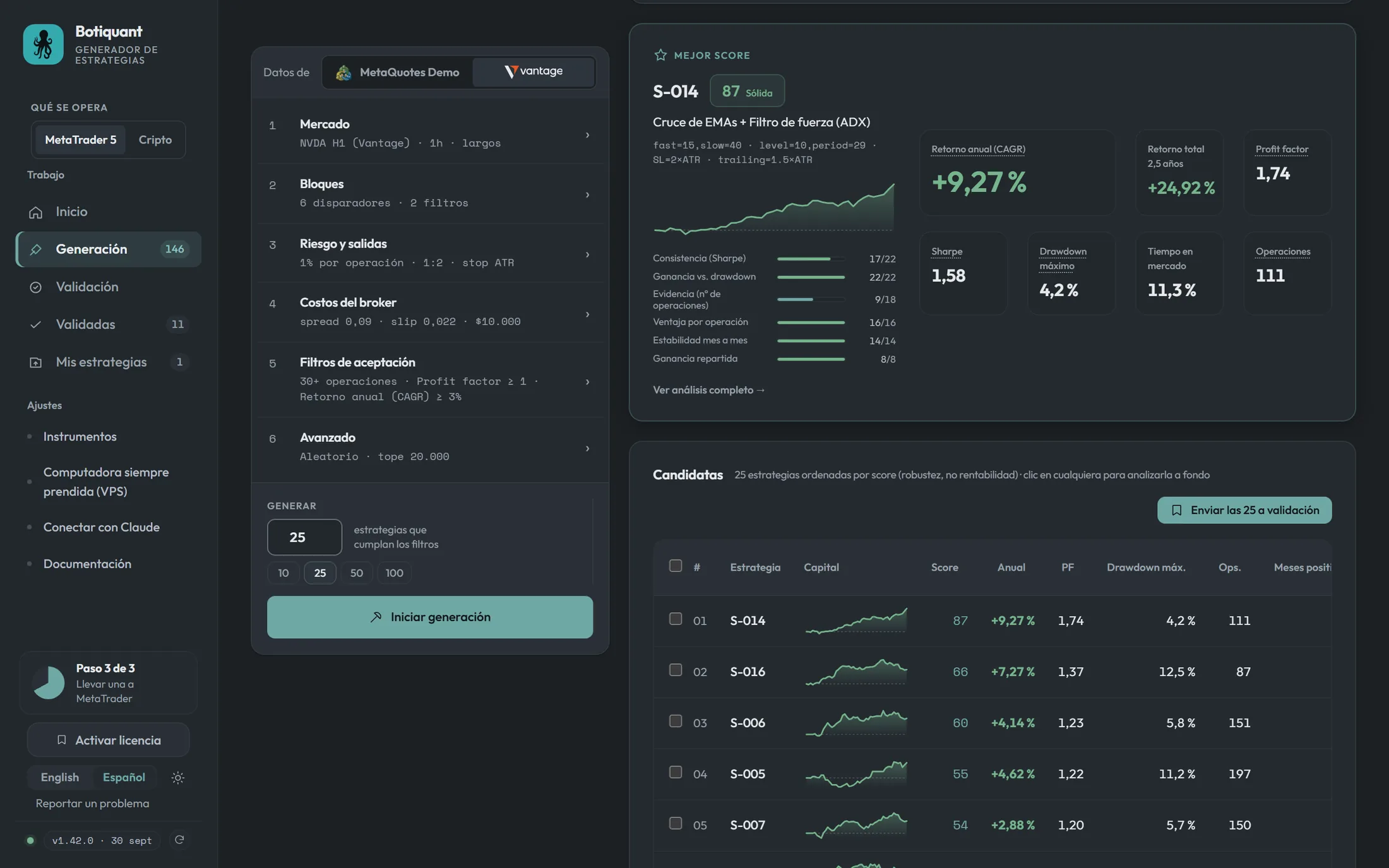
Screenshot of the application. Backtest results do not anticipate future results.
You define the framework. The search engine generates the combinations.
No coding required. You select the available building blocks, the risk per trade and the minimum criteria a strategy must meet to enter Candidates.
The market
Instrument, timeframe and analysis period. Includes more than 70 markets in one-hour candles: indices, forex, metals, US stocks and crypto.
The components
The indicators the engine can use as entry signals and as context filters. The more you enable, the larger the search space.
The risk
Risk per trade and the risk/reward ratio. The stop distance is not set by hand: it is expressed in multiples of volatility and optimized by the engine.
The acceptance criteria
Your broker's real costs and the filters each candidate must pass. You decide how many strategies you need, and the search continues until it finds them.
Two searches with the same configuration do not produce the same results
With only six entry blocks and two active filters, the strategy space is so large that two random searches practically never overlap.
The strategy you evaluate is the strategy that runs
Each strategy is exported as a MetaTrader 5 Expert Advisor or as a TradingView script, with the same rules evaluated on closed candles. No repainting and no look-ahead bias.
MetaTrader 5 (.mq5)
Compile it with F7 in MetaEditor. The terminal calculates the volume of each trade from the defined risk, and the EA writes the effective risk to the log so you can verify it on the first order.
TradingView (Pine v5)
Paste it into the Pine Editor and add it to the chart. It marks every candle with a signal, so you can tell whether a strategy did not trade because there was no entry or because the order was not filled.
What Botiquant does not do
Much of the software in this category promises profitability. We prefer to state its limits, because they are what make a strategy work on historical data and fail with real capital.
Before trading any strategy
- It does not promise returns. Every profit figure in the application comes from your own backtest, on your data and your costs.
- A backtest does not anticipate the future. Finding a strategy that worked on historical data is easy; whether it keeps working is a different matter.
- An extensive search finds results by chance. Across 460 million combinations there will always be some that look good without any real edge. That is why you can generate on one part of the history and validate on another that the search never saw.
- Criteria are defined before searching, not after. Adjusting the filters until an attractive result appears amounts to choosing the result, and that strategy fails out of sample.
- Costs must be the real ones. An optimistic spread turns a losing strategy into a winner inside the backtest and nowhere else.
User reviews
I will never trade manually again. Quantitative trading was a turning point in the way I trade.
I cannot believe it is free. I can test more than 1,000 strategies a day, something unthinkable a few weeks ago.
Reviews from Botiquant users, translated from Spanish. Each user's results depend on their configuration, their data and their broker: Botiquant does not promise returns and no strategy guarantees future results.
Three steps to begin
The application runs on your computer. That is not a limitation: it is what avoids queues, usage quotas and a server shared among all users.
Create your account
With Google, in two clicks. Free and no card required.
Download and unzip
A .zip file for Windows 10 and 11: unzip it and run Botiquant.exe, with no installer. It does not require Python or any other component.
Load your data
Download the instruments you need from within the application, or import a CSV from MetaTrader, TradingView or any platform.
Frequently asked questions
Does it use artificial intelligence?
The search engine does not: it is random and deterministic. It tests combinations, evaluates them with backtests and ranks them by a score, and the seed reproduces a complete run, something a generative model cannot do.
Optionally, Botiquant integrates with Claude (Anthropic) through MCP (Model Context Protocol). With the connection active, you can ask Claude Desktop or Claude Code to generate, validate and analyze strategies in Botiquant, and to explain the results to you. The connection is enabled from within the application, and what Claude reads is processed through your own Claude account.
Do I need to know how to code?
No. You select blocks from a list and adjust two risk parameters. The application generates the MetaTrader or TradingView code.
Where does the data come from?
The application includes more than 70 markets in one-hour candles, measured on the Vantage and MetaQuotes servers, and Binance crypto perpetuals. Any other instrument can be downloaded from your open MetaTrader 5, with the name your broker uses, so what you generate is tested in the Strategy Tester on the same candles. You can also import your own CSV from MetaTrader, TradingView or any platform.
Can I use my own broker and my costs?
Yes, and it is recommended. Spread, slippage and commission are configured manually, and the application shows their cost per trade in price units and as a percentage of the current price.
Do I need an account?
Yes, and it is free. It is created with Google in two clicks and is used to download the application and obtain the license. After that the application works on its own: it needs no connection to run backtests or generate strategies.
Windows says the publisher is unknown. Is that normal?
Yes. That notice ("Windows protected your PC") appears with any new application that has not yet built up a download history, and says nothing about how it works. Click More info and then Run anyway. It appears only once: from the second launch on, Windows no longer asks.
Do I need an internet connection to use it?
No. The license is verified on your own computer, without contacting any server. A connection is only needed to download new market data or update the application.
Why is it an application and not a website?
Because searching for strategies requires real computing power: a complete run can occupy a core for minutes. On a website all users would share the same server, with queues, quotas and usage limits. On your computer those restrictions do not exist, and your data stays there.
What does Botiquant see of my Google account?
Your name, your email address and your photo. Nothing else: no permissions are requested over your email, calendar or files. Sign-in happens on Google's side, so your credentials never pass through Botiquant.
Can it trade automatically?
The exported Expert Advisor can trade automatically in MetaTrader 5. Before using it with real capital, run it in your own broker's Strategy Tester and on a period that was not used in the search.
Does it work for crypto?
Yes. Botiquant has two sections, chosen at the top: MetaTrader 5 for CFDs and forex, and crypto for perpetual futures. The workflow is the same —generate, validate on data the search never saw and select the strategies that meet the criteria— and, in crypto, robots can also trade from within the application once you connect your exchange account (Binance or BingX) with an API key, with commissions and funding included in every measurement.
Try it on your own data
The only way to evaluate it is to generate strategies on the instrument you trade, with your broker's costs.